
The signal-based prospecting agent
Your signal-based prospecting agent watches your market for you - new hires, public procurement wins, funding news, and more - and turns the ones that matter into ready-to-work opportunities, scored against your ICP and dropped straight into your pipeline.
Why use a signal-based prospecting agent?
Traditional prospecting means either working a static list until it goes stale, or manually scanning the news hoping to catch the right moment. A signal-based agent flips that around:
- It's always watching. Once it's set up, the agent continuously monitors news and recruitment signals for companies in your segment or list - you don't have to remember to check.
- It catches the moment, not just the company. A company winning a big contract, losing one to a competitor, or hiring a new decision-maker is often exactly when they're worth a call. The agent is built to catch that timing, not just tell you a company exists.
- It only surfaces what's worth your time. Every signal is evaluated against your ICP before it reaches you, so you get qualified opportunities, not a raw news feed.
- It keeps your pipeline warm without manual work. Qualified companies land straight in your positive outcome list - and in your CRM, with research notes attached, if you've connected one.
In short: less time hunting for the right prospect at the right moment, more time actually talking to them.
How it works, briefly
The agent watches a segment or list of companies for relevant signals (news, recruitment, and more depending on your setup). When a signal shows up, it evaluates the company against your ICP. If it's a good fit, the company - with the signal that triggered it and the reasoning behind the match - goes to your positive outcome list. If not, it goes to your negative list, so you always know what was considered and why.
How to set it up
You'll find the signal agent under Settings. Click Add a new agent and work through these fields:
- Agent for (Admins only). If you're an account admin you can create and edit agents for other users on your account.
- Source. Choose what the agent should watch, Segment or list. This can be a broader ICP segment to find new prospects, or one of your own lists, such as your qualified list, so the agent watches companies you're already tracking rather than only fresh ones.
- Trigger by. Choose:
- Signals - the agent monitors news and recruitment signals continuously and acts the moment something relevant happens. Add specific instructions (e.g. "sales and growth-related signals") or leave this blank to use Goava's default profile.
- Schedule - the agent runs nightly and delivers a set number of qualified prospects on a rhythm you choose (e.g. 3 per day), if you'd rather keep a steady, predictable flow instead of event-driven bursts.
- Ideal customer profile. Choose which Ideal Customer Profile the agent scores prospects against. This is what decides who's a good fit.
- Segment/List: Choose which segment/list the agent should prospect from. This defines the pool of companies the agent evaluates. Make sure your segment reflects your target market — the tighter and more relevant the segment, the better the results.
- AI credit budget. Set a cap per prospect, or per day/week/month, to keep spend predictable. Start conservative and loosen it once you trust the quality.
- Positive outcome list (only when running in segments). Where qualified companies land - this is the list you and your team will actually work.
- Negative outcome list (only when running in segments). Where rejected companies go, so nothing disappears silently and you can always sanity-check the agent's calls.
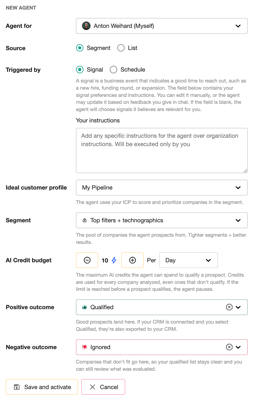
Toggle the agent Active/Inactive any time to pause or resume it, and click Save to apply changes. You can run several agents in parallel - for example, one per segment or ICP - each watching for its own signals.
Good to know: list monitoring is brand new. Right now it works with your own lists (like a qualified pipeline list); CRM-synced relationships such as "customers" aren't yet selectable as a list to monitor, and each agent currently watches one list at a time. If you want to monitor several lists at once (say, qualified, converted, and lost), you'll need a separate agent per list for now - we're actively working on making this more flexible.
For account admins: setting up agents on behalf of your team
If you're an account admin, you can now set up and manage signal-based prospecting agents for other users directly from the admin module - you're no longer limited to configuring your own agent. When you set one up on someone's behalf, you can see and select from that user's own lists, so you can get their outcome lists (and their agent's monitoring instructions) configured correctly without needing them to do it themselves.
This is especially handy when you're onboarding a new team, standardizing how a sales team's agents are configured, or just helping a colleague get unstuck.
What the results look like
Once your agent is live, here's where you'll see it working:
- Your positive and negative outcome lists. Qualified companies appear in your positive list, ready to work; rejected ones sit in the negative list so you can spot-check the agent's judgment.
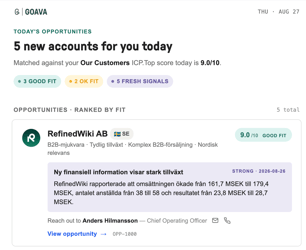
- The company dashboard. Open any prospect to see the full Goava dashboard, including the signal that triggered it and the agent's reasoning for why it's a fit.
- Your daily (or weekly) email digest. A summary of what the agent found lands in your inbox - daily at 8:00 AM, or weekly on Monday mornings if you'd rather batch it - so you don't need to log in to stay on top of new opportunities.
- Your CRM, if connected. Qualified companies flow straight into your CRM pipeline, with research notes and contacts attached automatically when Research Agent Automations are configured.
- Start with a narrow, well-defined segment or list rather than something broad - quality beats volume, especially at first.
- Check your first few batches on both the positive and negative lists to make sure the agent's calls match your own judgment.
- Give feedback to the agent if a signal is irrelevant or a company is bad fit. Just open the research chat and say "@goava this signal is irrelevant for because..."
- Use separate agents for meaningfully different segments or ICPs rather than one agent trying to cover everything.
- Pair the agent with Research Agent Automations so every qualified company arrives with context already attached.
- Begin with a conservative credit budget and raise it once you're happy with the quality of what's coming through.
Questions about setting up your first signal-based agent, or want a hand configuring one for your team? Reach out to us - we're happy to help.